Sign up and log in
Sign up
Upon signing up, you'll receive a confirmation email with a verification link. Click the link, set your password, and then log in to Sympheny.
Log in
When you log in for the first time, you'll need to accept Sympheny's General Terms and Conditions. It's mandatory to accept these terms to use the web app.
Log in with MFA (multi-factor authentication)
For added security, you can enable multi-factor authentication (MFA) to log in to your Sympheny account:
- Enter your email and password as usual.
- Scan the QR code using an authenticator app on your phone.
- Enter the code provided by the authenticator app to complete the login process.
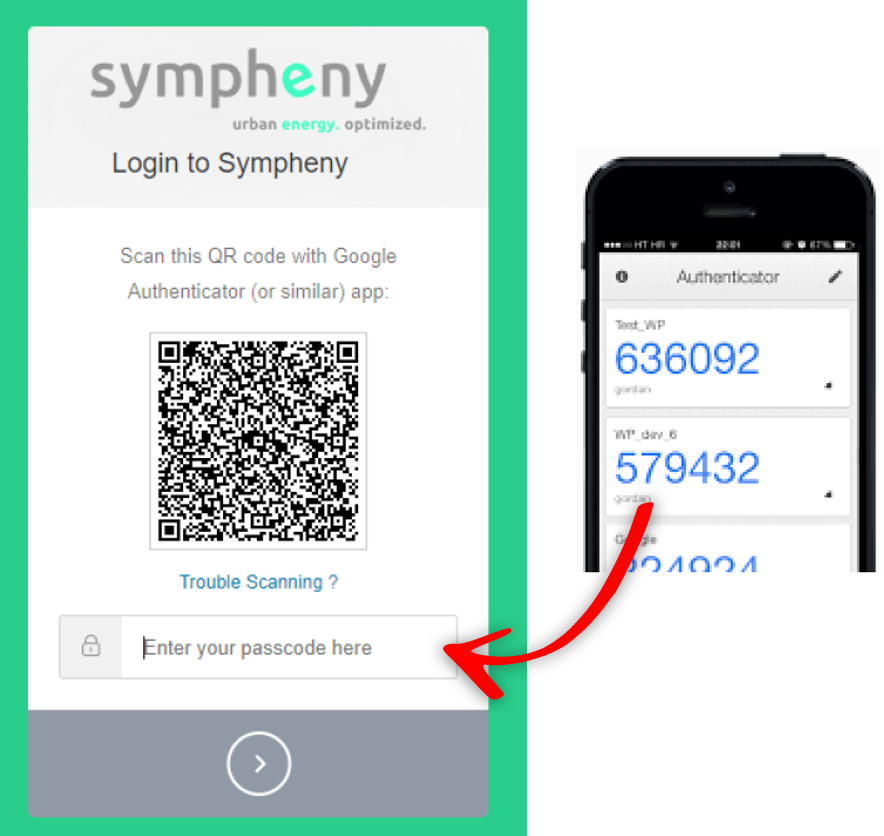
If you'd like to enable MFA or have any questions, feel free to contact us for assistance.
What's next?
Now that you're signed in, read Structure to see how the web app is organised: how projects, analyses, scenarios, executions, and solutions relate to each other. From there you can walk through the Quick start and then build your own model with the Step-by-step guide.