How-to guides
The Sympheny web app organizes energy planning into a structured workflow. Projects are broken down into analyses, and each analysis is further divided into scenarios.
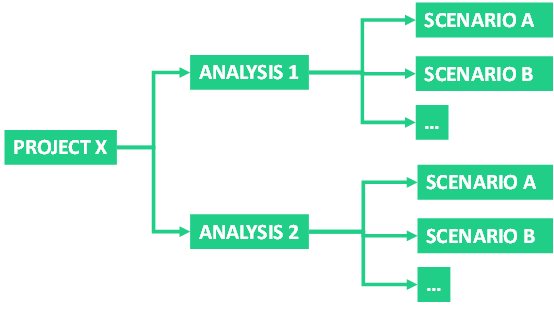
Hierarchical structure
This hierarchical structure mirrors typical energy planning workflows:
- Projects represent individual sites where you develop an optimal energy supply system.
- Analyses consist of multiple iterations that progressively refine the energy supply system design for a specific site.
- Scenarios let you explore different potential futures, such as energy price conditions or demand assumptions, or compare alternative design variants.
Executing scenarios
During optimization, you can run a single scenario or execute all scenarios within an analysis at once. On the Execution page, you can choose from a variety of objective functions and execution parameters.
Scenario results
After execution, you can access the input data and output files behind the optimal design and operation of your energy systems. An interactive dashboard also provides result visualizations for all scenarios. See Scenario Results for details.
Database Center
The Database Center gives you an overview of all your data. It also lets you download or upload databases from other sources directly to the web app.
EnyTool
EnyTool connects the web app to partner tools and datasets across the Sympheny ecosystem, including synthetic demand modelling with the RAMP tool suite.
EnyFlow
EnyFlow is a Jupyter Notebook environment for building custom workflows, analyses, and visualizations on top of the Sympheny API.